• RSS
  • Delicious
  • Digg
  • Facebook
  • Twitter
  • Linkedin

Showing posts with label Free Downloads. Show all posts

Saturday, March 26, 2011

Download Snow Transformation Pack 1.5

Posted by Lucky On 4:20 AM

Snow Transformation Pack 1.5 released by - STP will transform your Windows 7/Vista user interface to look like Mac OS X Snow Leopard.
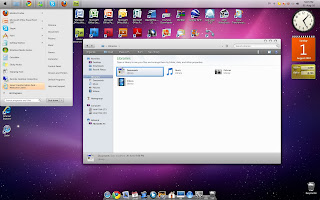
Snow-Transformation-Pack-1.5

Like the look and feel of MAC OSX, but don’t want to switch from Windows? You can try the Snow Transformation Pack (STP) for Windows Vista and Windows 7. STP is more than just a theme; it completely changes the look and feel of Windows, including the welcome screen, icons, wallpaper, sounds, dock and overall visual style. While the changes are complete, it is also reversible. You can also revert to the classic Windows appearance and style by simply uninstalling the pack from ‘Add/Remove Programs’.

You can get for free from winxsoft

Saturday, March 5, 2011

OrangeNote Software Review

Posted by Lucky On 9:17 AM

OrangeNote is a text-clipping manager for Windows and MAC operating system. The utility that comes with this software is that you can create and store a complete amount of unlimited number of ‘clippings’ in an indexed, tagged and searchable format.

orangenote software screenshot

To easy your clippings, OrangeNote allows you to assign keyboard shortcuts to often and frequently used clippings to instantly paste them into an email or a document editor. This technique helps to save a lot of time, as well as, create more productivity. For example, you could save a signature as a clipping and then simply copy-paste it in any text editor with just a keyboard shortcut, assigned to it.
The free version is unlimited, but a paid version comes with a bit more connectivity. The paid OrangeNote version allows you to sync clippings across computers.

Wanna give it a try? Then download it from: http://orangenote.littlesoftware.ca
Please comment to let me know what you feel about this new software product.

Wednesday, February 16, 2011

Convert movies with PSPvideo9 for PlayStation Portable

Posted by Lucky On 7:39 PM

PlayStation Portable has always been a favorite as a portable medium, to play games, watch movies. PSP Games need no introduction as how great they are. Let’s turn our views to the Movies section that turn out to be really great when the movies are properly formatted to the aspect ratio of a PlayStation Portable. The problem with HD movies is that they are wide screen ones and they need to be properly tuned to fit the screen. For tweaking up the movies, I use free software called PSPvideo9.

convert movies for PlayStation Portable using PSPvideo9

The software’s really great. It ensures maximum compatibility with your system and takes care of transferring the videos to the appropriate folder on the Memory Stick if you connect the PSP to the PC.
So, if you are willing to try out this software to convert the videos visit http://www.pspvideo9.com

Sunday, February 6, 2011

Focus Booster App

Posted by Lucky On 11:44 AM

Focus Booster Application is a time versus work management app.  It is a must for those persons who find it difficult in finishing an assigned task in a given set of time. Focus Booster is completely a free program for MAC and Windows users. It requires Adobe AIR as its minimum requirement.

focus booster application

The program displays a timer with its color changing as time progresses. The trick on which the app is created dates back to the 1980s. When Francesco Cirillo created this ‘Pomodoro’ technique. The user won’t get bored out because Focus Booster provides regular breaks from the assignment for increased efficiency and productivity.

You can download Focus Booster App from www.focusboosterapp.com